Base64 · 5 min read
Base64 to JSON: Decode a Payload Step by Step
Turn a Base64 string back into JSON on the command line, in Python, Node.js, the browser or jq, and fix the errors and silent failures you will hit.
Last updated
On this page
To turn Base64 into JSON, decode the Base64 to bytes, read those bytes as UTF-8 text, and parse the text as JSON. In a terminal, echo '<base64>' | base64 -d | jq . does all three steps. In Python, it is json.loads(base64.b64decode(s)), and in Node.js JSON.parse(Buffer.from(s, 'base64').toString('utf8')). Most failures come from the first step: a URL-safe string, missing = padding or a data: prefix. Below is one real payload decoded in each tool, with the exact errors.
Recognise Base64 JSON
Base64 uses A–Z, a–z, 0–9, + and /, with up to two = at the end. JSON leaves a clear mark at the start: {" always encodes to ey, and compact JSON objects whose first key starts with a letter or underscore start with eyJ. That is why JWTs start with eyJ. Arrays start with W, because [ encodes to it.
Our example is a webhook event, 144 characters of Base64:
eyJldmVudCI6Im9yZGVyLnBhaWQiLCJvcmRlciI6eyJpZCI6MTAwMSwidG90YWwiOjQ5LjksImN1cnJlbmN5IjoiRVVSIn0sImN1c3RvbWVyIjp7Im5hbWUiOiJab8OrIE3DvGxsZXIifX0=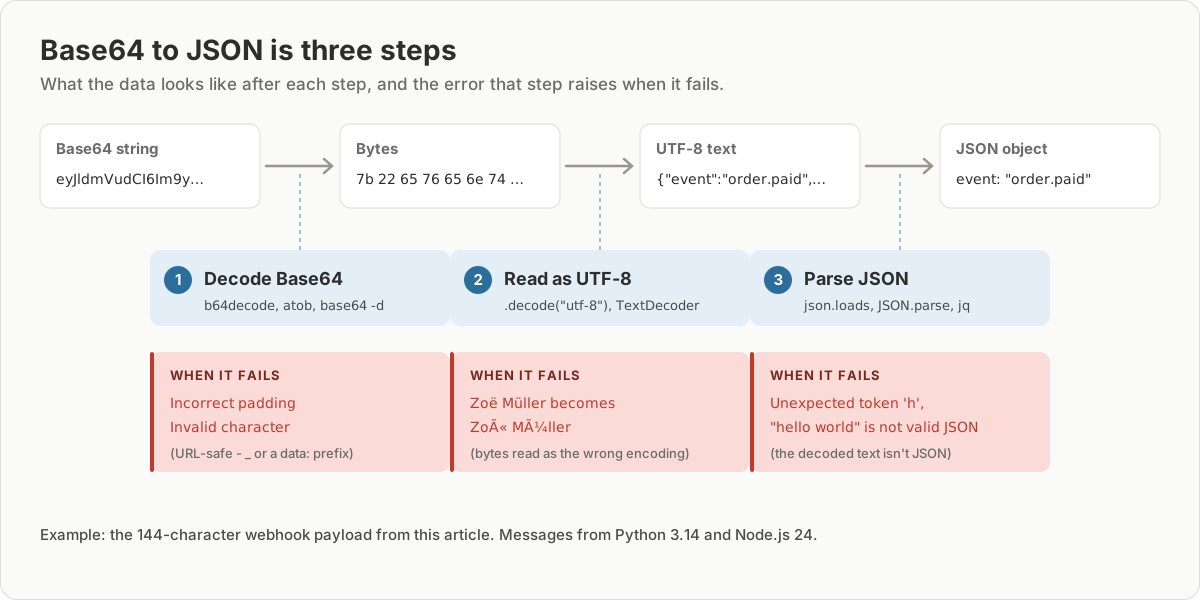
Decode it in the terminal
base64 -d payload.b64 | jq .{
"event": "order.paid",
"order": {
"id": 1001,
"total": 49.9,
"currency": "EUR"
},
"customer": {
"name": "Zoë Müller"
}
}If you don't have jq, python3 -m json.tool --no-ensure-ascii formats it instead. Without that flag, it prints Zo\u00eb for Zoë. For a Base64 value inside a JSON document, jq can do the decoding itself:
jq '.data | @base64d | fromjson' envelope.json@base64d decodes the field and fromjson parses the result, so you get an object, not a string of escaped JSON.
Decode it in Python
import base64
import json

encoded = open("payload.b64").read().strip()

raw = base64.b64decode(encoded, validate=True)  # bytes; fail on bad characters
text = raw.decode("utf-8")                      # bytes -> str
data = json.loads(text)                         # str -> dict

print(data["customer"]["name"], data["order"]["total"])
It prints Zoë Müller 49.9. Keep validate=True. Without it, Python silently drops characters that aren't in the Base64 alphabet, which turns some mistakes into a misleading error, as shown below.
Decode it in Node.js and the browser
import { readFileSync } from 'node:fs';

const encoded = readFileSync('payload.b64', 'utf8').trim();

const text = Buffer.from(encoded, 'base64').toString('utf8');
const data = JSON.parse(text);

console.log(data.customer.name, data.order.total);
Browsers have no Buffer. Use atob, but don't parse its result directly. atob returns one character per byte, so JSON.parse(atob(encoded)) gave Zoë Müller for our name. Turn the result into bytes and decode them as UTF-8:
const bytes = Uint8Array.from(atob(encoded), (c) => c.charCodeAt(0));
const data = JSON.parse(new TextDecoder().decode(bytes));
URL-safe Base64 and missing padding
JWTs and many URLs use URL-safe Base64. It writes - and _ instead of + and /, and usually leaves off the = padding. The same JSON can look like either of these:
standard:  eyJ1cmwiOiJodHRwczovL2V4YW1wbGUuY29tLz9xPT4+In0=
URL-safe:  eyJ1cmwiOiJodHRwczovL2V4YW1wbGUuY29tLz9xPT4-In0
In Python, use base64.urlsafe_b64decode, and add the padding back first with s + "=" * (-len(s) % 4). In a terminal, basenc --base64url -d decodes the URL-safe form, but in our test it also needed the padding back first.
When this fails: errors and silent garbage
We ran each tool on the same broken inputs: Python 3.14, Node.js 24, and base64 on Ubuntu 26.04, which is uutils coreutils 0.10.
| Input | Python b64decode(validate=True) |
Node.js atob |
base64 -d |
|---|---|---|---|
Missing = padding |
binascii.Error: Incorrect padding |
Decodes fine | Decodes fine |
URL-safe - or _ |
binascii.Error: Only base64 data is allowed |
InvalidCharacterError: Invalid character |
base64: error: invalid input |
data:application/json;base64, prefix |
binascii.Error: Only base64 data is allowed |
InvalidCharacterError: Invalid character |
base64: error: invalid input |
| Decodes, but isn't JSON | JSONDecodeError: Expecting value: line 1 column 1 (char 0) |
SyntaxError: Unexpected token 'h', "hello world" is not valid JSON |
jq: parse error: Invalid numeric literal at line 1, column 6 |
Python without validate=True blames the wrong thing. On the URL-safe string above, plain b64decode dropped the -, then reported Incorrect padding, even though the padding was correct.
Node's Buffer never fails. It decoded URL-safe input and missing padding correctly, which is convenient. But it also decoded a string with a data:application/json;base64, prefix into random bytes, and "not base64!!" into 6 bytes, without any error. If the input might be wrong, check the JSON parse result, or remove a data: prefix with s.slice(s.indexOf(',') + 1) first.
Garbled accents are a UTF-8 problem, not a Base64 one. Zoë instead of Zoë means the bytes were decoded correctly but read with the wrong text encoding.
Try it in JSON Workbench
Paste the string into the Base64 decoder and click Decode & Format. If the result is JSON, it opens formatted in a new tab, where you can switch to Tree or Table view. Anything else opens as plain text. It accepts URL-safe Base64 and adds missing padding itself. The input must be one unbroken string, though: the base64 command wraps its output every 76 characters, and the decoder rejects those line breaks with "Content is not a valid Base64 string". Encode with base64 -w 0 or remove the line breaks before pasting. For a whole JWT, which is three Base64 parts joined with dots, use the JWT debugger. To check what changed between two decoded payloads, paste both into JSON Compare.
FAQ
How do I convert Base64 to JSON?
Decode the Base64 to bytes, read the bytes as UTF-8 text, then parse the text as JSON. On Linux or macOS that is echo 'eyJhIjoxfQ==' | base64 -d | jq . and in Python json.loads(base64.b64decode(s)). You can also paste the string into the Base64 decoder and click Decode & Format.
Why does my Base64 string start with eyJ?
eyJ is how {" looks in Base64, so a string starting with eyJ is almost always a JSON object whose first key starts with a letter or underscore. JWT headers and payloads start with eyJ for the same reason. Arrays start with W, as [ encodes to W.
How do I decode Base64 JSON in JavaScript?
In Node.js, JSON.parse(Buffer.from(s, 'base64').toString('utf8')). In the browser, decode with atob, turn the result into bytes and read them with TextDecoder before JSON.parse. atob on its own garbles any character outside ASCII, such as ë.
Is Base64 encryption?
No. Base64 is an encoding that anyone can reverse without a key, as every example on this page shows. Treat Base64 JSON from a token or a config file as readable by anyone who has it.
How do I decode a Base64 field inside a JSON file?
With jq, run jq '.data | @base64d | fromjson' file.json. @base64d decodes the field and fromjson parses the result, so you get the inner object formatted, not a string.
Try it yourself
Open the Base64 decoder
Free, no sign-up. Your file is read and parsed in your browser.
Open the Base64 decoder