Base64 · 5 min read
Why Your Base64 Decode Gives Garbage Text (UTF-8 and Padding)
Decoded Base64 JSON shows é, �, spaces between letters or binary junk? Read the first characters to find the cause, then fix it in Python or Node.js.
Last updated
On this page
When Base64-decoded JSON comes out as garbage, the Base64 step almost always worked. The bytes are just not what you expected. The common causes:
- The text was encoded as UTF-16 or with a byte order mark.
- The bytes were read with the wrong text encoding, which gives
éand�. - The data was compressed or Base64-encoded twice.
- Padding or the alphabet is off.
In Python, json.loads(base64.b64decode(s, validate=True)) handles the encoding cases on its own. To find out which case you have, look at the first four characters of the Base64 string. Below are the prefixes, the exact errors each case gives in Python 3.14 and Node.js 24, and how to fix them.
Read the first characters
Base64 encodes 3 bytes into 4 characters, so the start of a file's bytes always produces the same start of Base64. All examples here encode {"name":"José","city":"Zürich"}:
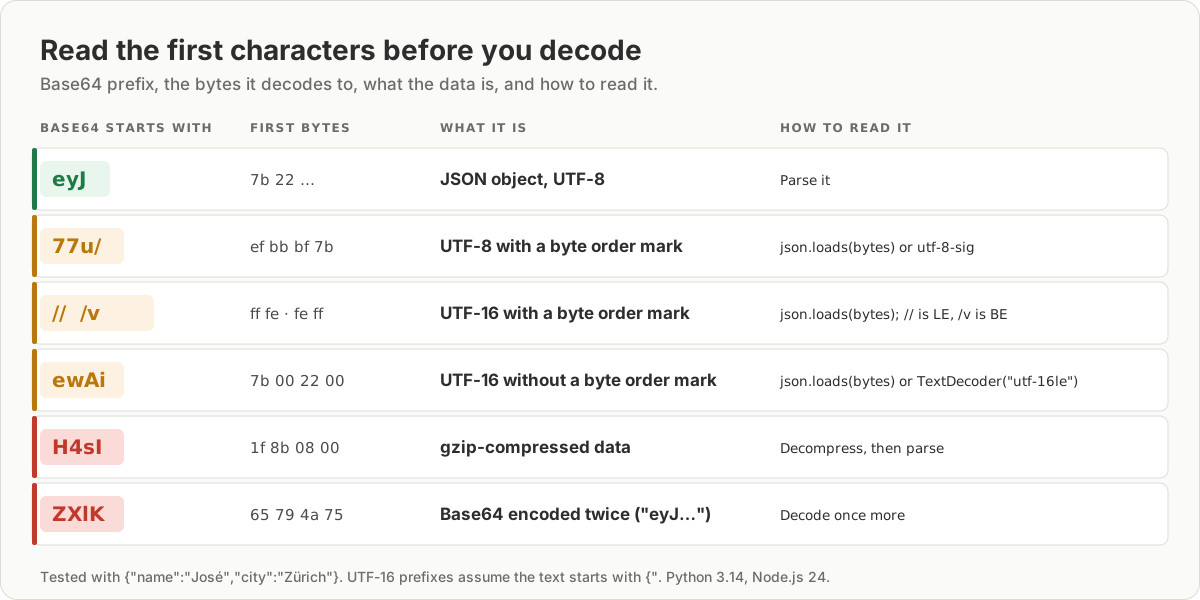
| Base64 starts with | What it is |
|---|---|
eyJ or W3 |
JSON object or array, as UTF-8 |
77u/ |
UTF-8 with a byte order mark (BOM) |
// or /v |
UTF-16 with a BOM |
ewAi |
UTF-16 without a BOM (starts with {") |
H4sI |
gzip-compressed data |
ZXlK |
Base64 of Base64 (eyJ encoded again) |
If you have the decoded bytes, the file command names them too. It reported gzip compressed data, UTF-16, little-endian text and UTF-8 (with BOM) text for our samples:
echo '<base64>' | base64 -d | file -é and ü: UTF-8 read as Latin-1
José became José when the UTF-8 bytes were read as Latin-1. Each accented letter is two bytes in UTF-8, and Latin-1 shows each byte as its own character. Python's .decode("latin-1"), Node's toString('latin1') and the browser's bare atob all do this. Decode as UTF-8 instead. If you only have the garbled text, reverse it:
garbled = "José"
print(garbled.encode("latin-1").decode("utf-8"))  # José
The opposite case shows �. The data was encoded as Latin-1, so é is a single byte, 0xe9, and that byte is not valid UTF-8. Python refuses it with UnicodeDecodeError: 'utf-8' codec can't decode byte 0xe9 in position 12: invalid continuation byte. Node's Buffer doesn't fail. It turned the name into Jos�, and JSON.parse accepted the result. Use new TextDecoder('utf-8', { fatal: true }) to get an error instead: TypeError: The encoded data was not valid for encoding utf-8.
Letters with gaps: UTF-16
UTF-16 stores every ASCII letter as two bytes, one of them zero. Decoded as UTF-8, {"name" becomes {\u0000"\u0000n\u0000a…, which looks like spaces between letters in most viewers. Node gave SyntaxError: Expected property name or '}' in JSON at position 1 (line 1 column 2). With a BOM in front, Python stopped earlier with UnicodeDecodeError: 'utf-8' codec can't decode byte 0xff in position 0: invalid start byte.
The fix is to decode with the right encoding:
import base64
import json

encoded = open("payload.b64").read().strip()
raw = base64.b64decode(encoded, validate=True)

data = json.loads(raw)  # bytes: Python detects UTF-8, UTF-16, UTF-32 and a UTF-8 BOM
print(data["name"], data["city"])
Passing bytes to json.loads is the important part. It printed José Zürich for the UTF-8, UTF-8 with BOM, UTF-16 with BOM and UTF-16 without BOM samples. Calling .decode("utf-8") first fails on three of the four.
In Node.js and browsers, new TextDecoder('utf-16le').decode(bytes) reads UTF-16, or 'utf-16be' when the Base64 starts with /v. A plain TextDecoder() already drops a UTF-8 BOM, while Buffer#toString keeps it, and JSON.parse fails with Unexpected token followed by an invisible character, which is the BOM.
Binary junk: compressed or encoded twice
H4sI means gzip. Decoded as text, it shows control characters and �. Decompress before parsing:
echo 'H4sIAAAAAAAC/6tWykvMTVWyUvLKLz68UklHKTmzpBLIjTq8pygzOUOpFgCQh+39IQAAAA==' \
| base64 -d | gunzip | jq -c .{"name":"José","city":"Zürich"}In Python, that's gzip.decompress(raw), and in Node.js, zlib.gunzipSync(buffer).
If the decoded text starts with eyJ, it was Base64-encoded twice. Decode it once more.
When this fails: padding, alphabet and cut-off strings
| Symptom | Cause | Fix |
|---|---|---|
binascii.Error: Incorrect padding |
Missing = |
Pad to a multiple of 4: s + "=" * (-len(s) % 4) |
| Same error, but the padding looks right | URL-safe - or _ dropped by a lenient decoder |
base64.urlsafe_b64decode |
JSON ends early: Expecting ':' delimiter: line 1 column 22 |
The string was cut off when copied | Copy the whole value again |
Unexpected UTF-8 BOM (decode using utf-8-sig) |
BOM before the JSON | Pass bytes to json.loads, or decode with utf-8-sig |
Lenient decoders can return junk without an error. Python's b64decode without validate=True drops characters outside the standard alphabet. On the URL-safe string eyJxIjoiPj8-Pz4_Pj8ifQ==, it dropped the - and _. It then returned {"q":">? followed by random bytes, with no error. Turn validation on, and use the URL-safe decoder for URL-safe input.
A cut-off string can still decode. We cut our 44-character Base64 to 30 characters. After padding, it decoded to {"name":"José","city", so the Base64 step looked fine and only the JSON parser complained. Node gave Expected ':' after property name in JSON at position 21 (line 1 column 22).
Try it in JSON Workbench
Paste the Base64 into the Base64 decoder and click Decode & Format. In our test:
- The UTF-8 sample with a BOM decoded to formatted JSON.
- UTF-16, gzip and double-encoded input opened as plain text. Use the prefix table above to see which case you have.
- A Latin-1 sample decoded as JSON with
Jos�, and the success message still appeared. Check accented characters after decoding.
For the basic steps of decoding, see Base64 to JSON: decode a payload step by step. To compare a payload decoded two different ways, paste both into JSON Compare.
FAQ
Why does my decoded Base64 show characters like é or ü?
The bytes are UTF-8, but something read them as Latin-1 or Windows-1252. é is two bytes in UTF-8, and read one byte at a time they show as é. Decode the bytes as UTF-8. If you only have the garbled text, s.encode("latin-1").decode("utf-8") restored "José" in our test.
Why does my decoded JSON have spaces or \u0000 between every letter?
The text is UTF-16, which uses two bytes per letter, and was decoded as UTF-8. Its Base64 usually starts with //, /v or ewAi. In Python, pass the bytes straight to json.loads, which detects UTF-16. In Node.js or the browser, use new TextDecoder('utf-16le'), or 'utf-16be' if the Base64 starts with /v.
What does Base64 starting with H4sI mean?
The data is gzip-compressed. H4sI is the Base64 of the gzip header bytes 1f 8b 08. Decode the Base64, decompress, then parse: base64 -d | gunzip | jq . in a terminal, or gzip.decompress in Python.
How do I fix "Incorrect padding" when decoding Base64?
Add = signs until the length is a multiple of 4: s + "=" * (-len(s) % 4) in Python. If the string contains - or _, it is URL-safe Base64, so use base64.urlsafe_b64decode. If padding the string makes it decode but the JSON is cut off, the string was truncated when it was copied.
How do I decode Base64 JSON in Python without garbage?
Use base64.b64decode(s, validate=True) and pass the resulting bytes straight to json.loads. In our tests, that handled UTF-8 with or without a byte order mark and UTF-16. It also raised an error on wrong input instead of returning junk.
Try it yourself
Open the Base64 decoder
Free, no sign-up. Your file is read and parsed in your browser.
Open the Base64 decoder