Base64 · 5 min read
Base64 vs Base64URL: Which One Is in Your Token or URL?
Base64URL swaps + and / for - and _ and usually drops the = padding. How to tell them apart, why standard Base64 breaks in URLs, and how to convert.
Last updated
On this page
Base64 and Base64URL encode the same bytes with almost the same 64 characters. Base64URL writes - instead of + and _ instead of /, and usually drops the = padding. Use Base64URL for anything that goes into a URL, a file name or a token. JWTs always use it, without padding. To tell which one you have, look for those characters: - or _ means Base64URL, and + or / means standard Base64. A string with none of them is valid in both. Below are the differences side by side, what breaks when you mix them up, and how to convert between them.
The same JSON, both ways
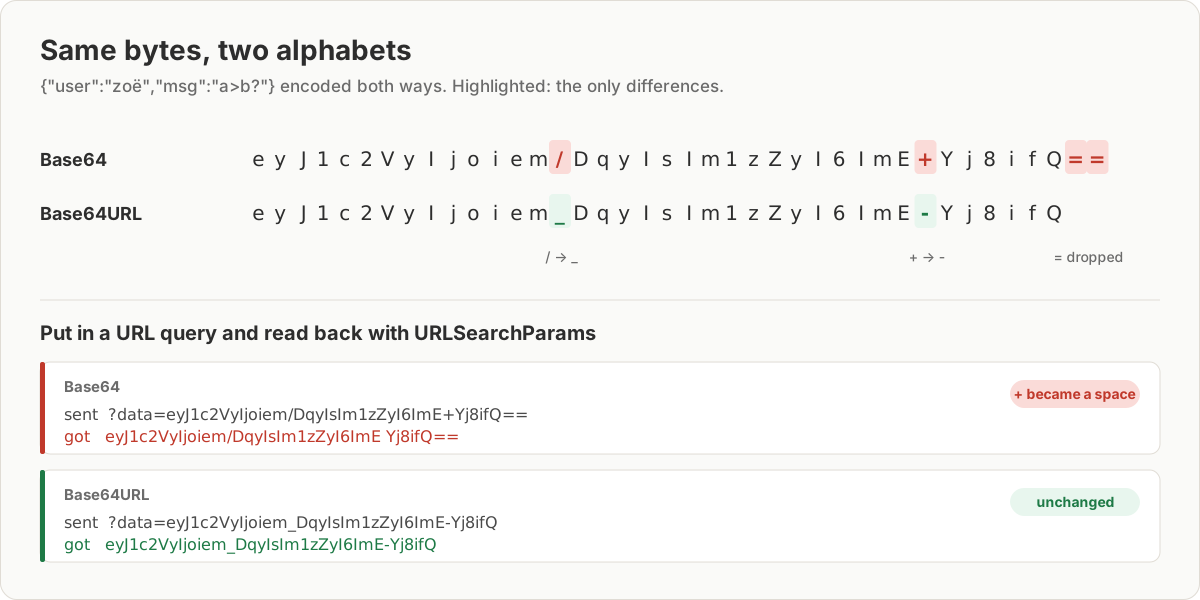
Here is {"user":"zoë","msg":"a>b?"} encoded both ways:
Base64:     eyJ1c2VyIjoiem/DqyIsIm1zZyI6ImE+Yj8ifQ==
Base64URL:  eyJ1c2VyIjoiem_DqyIsIm1zZyI6ImE-Yj8ifQ
They differ in exactly three places: / became _, + became -, and the == at the end is gone. Most short JSON contains none of these characters, so the two forms are often identical. That is why a mix-up can go unnoticed until one particular value breaks.
| Base64 | Base64URL | |
|---|---|---|
| Characters 62 and 63 | + and / |
- and _ |
= padding |
Required by most decoders | Usually left off |
| Safe in a URL as is | No | Yes |
| Used in | Email attachments, data: URIs, Kubernetes Secrets |
JWTs, URL parameters, file names |
What breaks when you mix them up
+ becomes a space in a query string. We put the standard string in ?data= and read it back with URLSearchParams.get('data'). The + came back as a space: …ImE Yj8ifQ==. Python's parse_qs did the same. Decoding then failed in different ways:
atobthrewInvalidCharacterError: The string to be decoded is not correctly encoded.- Python's
b64decoderaisedInvalid base64-encoded string: number of data characters (37) cannot be 1 more than a multiple of 4. - Node's
Bufferskipped the space and returned broken text, soJSON.parsefailed withBad control character in string literal in JSON at position 22.
/ splits a URL path. /t/<base64>/status became four path segments instead of three, because the / inside the Base64 looks like a separator.
The fix for both is the same: use Base64URL, or escape standard Base64 with encodeURIComponent (Python: urllib.parse.quote(s, safe="")). The escaped value, …ImE%2BYj8ifQ%3D%3D, came back unchanged.
A standard decoder refuses Base64URL. atob threw InvalidCharacterError on the - and _. jq's @base64d failed with is not valid base64 data, and basenc --base64url -d refused the standard string. Python's b64decode without validation is worse: it silently drops - and _ and can return junk instead of an error.
Convert between them
Node.js has base64url built in. Its decoders accepted both alphabets in our test, with or without padding:
const json = JSON.stringify({ user: 'zoë', msg: 'a>b?' });

const url = Buffer.from(json).toString('base64url'); // no padding
const std = Buffer.from(json).toString('base64');
console.log(url);
console.log(std);
console.log(Buffer.from(url, 'base64url').toString()); // {"user":"zoë","msg":"a>b?"}
In the browser, swap the characters yourself:
const toBase64Url = (s) => s.replace(/\+/g, '-').replace(/\//g, '_').replace(/=+$/, '');
const fromBase64Url = (s) =>
  s.replace(/-/g, '+').replace(/_/g, '/').padEnd(Math.ceil(s.length / 4) * 4, '=');
Chrome 155 also has Uint8Array.fromBase64(s, { alphabet: 'base64url' }) and bytes.toBase64({ alphabet: 'base64url', omitPadding: true }), which gave the same results. Node.js 24 doesn't have them yet, so check your target browsers before relying on them.
Python has urlsafe_b64encode and urlsafe_b64decode, but the encoder keeps the = padding and the decoder requires it:
import base64
import json

s = "eyJ1c2VyIjoiem_DqyIsIm1zZyI6ImE-Yj8ifQ"  # Base64URL, no padding

data = json.loads(base64.urlsafe_b64decode(s + "=" * (-len(s) % 4)))
print(data)  # {'user': 'zoë', 'msg': 'a>b?'}

raw = json.dumps(data, separators=(",", ":"), ensure_ascii=False).encode()
print(base64.urlsafe_b64encode(raw).decode().rstrip("="))  # same as s
Command line: basenc --base64url encodes and decodes the URL-safe form. On Ubuntu 26.04 it wrote the padding and required it when decoding.
JWTs: always Base64URL, never padded
A JWT is three Base64URL parts joined with dots: header, payload and signature. A common HS256 header is eyJhbGciOiJIUzI1NiIsInR5cCI6IkpXVCJ9, which decodes to {"alg":"HS256","typ":"JWT"}. To read a payload by hand, take the part between the two dots and decode it as Base64URL. Add padding first if your decoder needs it. Don't decode the whole token at once, because the dots aren't part of either alphabet.
When this fails
| Symptom | Cause | Fix |
|---|---|---|
| A space appears in the middle of the Base64 | + read from a query string |
Use Base64URL or encodeURIComponent |
InvalidCharacterError from atob |
Base64URL given to a standard decoder | Swap - _ back to + / first |
binascii.Error: Incorrect padding |
Base64URL without = in Python |
Pad to a multiple of 4 |
| Route or path not found | / inside Base64 in a URL path |
Use Base64URL |
Try it in JSON Workbench
The Base64 decoder accepts both alphabets. Paste either string from this page and click Decode & Format. It swaps - and _ back and adds missing padding itself. Encode always produces standard Base64 with +, / and padding. For a URL or a token, convert it with one of the snippets above. To read a JWT's header and payload, paste the token into the JWT debugger. For the steps of decoding a payload into JSON, see Base64 to JSON: decode a payload step by step.
FAQ
What is the difference between Base64 and Base64URL?
Two characters and the padding. Base64URL writes - instead of + and _ instead of /, so the result is safe in URLs and file names, and it usually leaves off the = padding at the end. Every other character is the same, so the decoded bytes are identical.
Is a JWT Base64 or Base64URL?
Base64URL without padding. Each of the three parts of a JWT is encoded that way, which is why a JWT never contains +, / or =. Decode a part with Buffer.from(part, 'base64url') in Node.js or base64.urlsafe_b64decode in Python after adding the padding back, or paste the token into the JWT debugger.
Why does my Base64 have a space in it after passing through a URL?
In a query string, + means a space. URLSearchParams in JavaScript and parse_qs in Python both turned the + in our Base64 into a space, and decoding then failed or gave broken JSON. Either use Base64URL, or escape the value with encodeURIComponent before putting it in the URL.
How do I convert Base64 to Base64URL in JavaScript?
Replace the two characters and drop the padding: s.replace(/+/g, "-").replace(///g, "_").replace(/=+$/, ""). In Node.js, Buffer.from(s, "base64").toString("base64url") does the same. To go back, swap the characters the other way and pad to a multiple of 4 with =.
Do I need the = padding?
It depends on the decoder. Node's Buffer and the JSON Workbench decoder accepted Base64URL without it, and the base64 command on Ubuntu 26.04 accepted standard Base64 without it. Python's urlsafe_b64decode failed with "Incorrect padding" until we added it back. When you write Base64URL for a JWT or a URL, leave the padding off.
Try it yourself
Open the Base64 decoder
Free, no sign-up. Your file is read and parsed in your browser.
Open the Base64 decoder