JSON editor · 6 min read
The Best Way to Edit Big JSON Files Without Crashing Your Editor
Why big JSON files freeze editors, measured on a 45 MB file, and how to edit them safely with jq, Python ijson, Node stream-json or JSON Lines.
Last updated
On this page
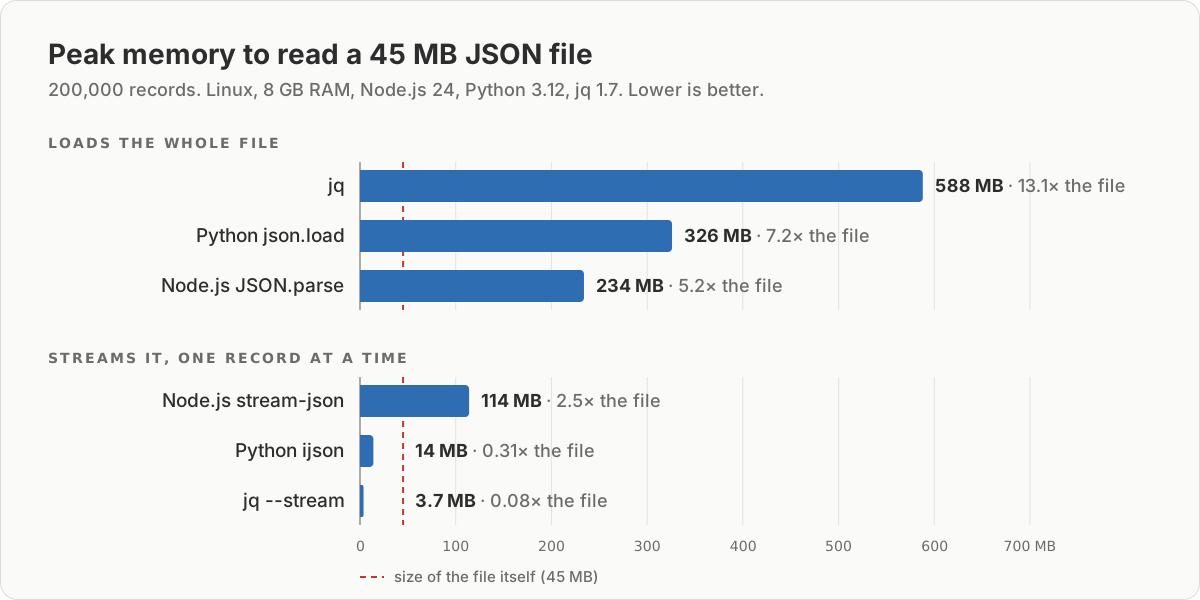
The best way to edit a big JSON file is to not open all of it. Editors crash on large JSON because the parsed data takes 5 to 13 times the file's size in memory, on top of the text and everything the editor draws. Under a few MB, any validating editor is fine. Past that, look at the file with jq first. If 13 times its size fits in free memory, change it with a jq filter. If it doesn't, stream it one record at a time with jq --stream, Python's ijson or Node's stream-json. On a 45 MB file those used 3.7 to 114 MB, against 234 to 588 MB for tools that load it all.
Why big JSON files crash editors
An editor holding a JSON file pays three costs at once:
- The text. A 45 MB file is 45 MB of string. JSON Workbench, for example, keeps it in the editor and in the app's state.
- The parsed data. Every object, key and number becomes a separate value in memory. This is the expensive part.
- Drawing it. Syntax colors, bracket matching, folding and the minimap all need extra work per line.
To put numbers on the second cost, we parsed a 45 MB file with 200,000 order records (Linux laptop, 8 GB RAM, 8 threads):
| Tool | Time | Peak memory |
|---|---|---|
Node.js 24 JSON.parse |
0.4 s | 234 MB |
Python 3.12 json.load |
0.9 s | 326 MB |
jq 1.7 jq length |
1.1 s | 588 MB |
jq 1.7 jq --stream |
2.9 s | 3.7 MB |
The third cost has limits built into the editor itself. Monaco, the editor component inside JSON Workbench, switches off syntax highlighting when a file is larger than 20 MB or has more than 300,000 lines, and stops sending the text to its background worker above 50 MB. When the colors suddenly disappear, that is why.
We also measured the JSON Workbench editor itself in Chrome. A 1 MB file loaded in 0.2 seconds. A 5 MB file loaded in 0.8 seconds, but after a single keystroke the page froze for about one second. Part of that is validation: the editor re-parses the whole text after every pause in typing. Our 20 MB run did not finish: the test machine, with other apps open, ran out of memory.
Pick a method by file size
| File size | What works |
|---|---|
| Under 1 MB | Any editor, including the browser |
| 1 to 10 MB | A browser or desktop editor, but expect pauses while typing. Better: extract the part you need |
| 10 MB up to about 1/13 of your free memory | jq filters, which load the whole file but don't render it |
| Bigger than that, or over 512 MB | Streaming: jq --stream, Python ijson, Node stream-json |
The 512 MB line is a hard limit in Node.js: a string can't be longer than 536,870,888 characters, so readFileSync fails before parsing even starts.
Look before you open
Find out the size and shape first. These commands read only what they need:
ls -lh orders.json
head -c 200 orders.json; echo
jq 'length' orders.json
jq -c '.[0]' orders.json
On our file, jq 'length' printed 200000 and jq -c '.[0]' printed the first order:
{"id":1,"customer":{"id":"c_0","name":"Customer 0","email":"c0@example.com"},"items":[{"sku":"SKU-0","qty":1,"price":9.99},{"sku":"SKU-0","qty":1,"price":4.5}],"status":"paid","createdAt":"2026-01-01T00:00:00.000Z"}Change every record with jq
When 13 times the file fits in memory, one jq filter is the simplest edit. This marks every shipped order as delivered. -c keeps the output compact, so the file doesn't grow with indentation:
jq -c 'map(if .status == "shipped" then .status = "delivered" else . end)' orders.json > orders.tmp && mv orders.tmp orders.jsonIt took 1.8 seconds and peaked at 618 MB. Writing to orders.tmp first matters: if jq fails halfway, the original is untouched.
Stream it when it doesn't fit
Streaming parsers read one record, hand it to your code and move on, so they never hold the whole file. Both scripts below write every refunded order to refunded.jsonl, one JSON object per line. Install the library first (pip install ijson or npm install stream-json).
import json

import ijson  # pip install ijson

count = 0
with open("orders.json", "rb") as src, open("refunded.jsonl", "w") as out:
    # "item" = each element of the top-level array, one at a time
    for order in ijson.items(src, "item", use_float=True):
        if order["status"] == "refunded":
            out.write(json.dumps(order, separators=(",", ":")) + "\n")
            count += 1

print(f"wrote {count} refunded orders")import fs from 'node:fs';
import chain from 'stream-chain';
import { parser } from 'stream-json';
import { streamArray } from 'stream-json/streamers/stream-array.js';
const out = fs.createWriteStream('refunded.jsonl');
let count = 0;
chain([
fs.createReadStream('orders.json'),
parser(),
streamArray(), // emits { key, value } for each array element
({ value }) => {
if (value.status !== 'refunded') return chain.none;
count++;
return JSON.stringify(value) + '\n';
},
out,
]);
out.on('finish', () => console.log(`wrote ${count} refunded orders`));Both print wrote 66666 refunded orders and produce byte-identical files. Python with ijson 3.5 took 1.0 second and 14 MB. Node with stream-json 3.7 took 2.8 seconds and 114 MB. use_float=True matters: without it, ijson returns prices as Decimal, and json.dumps fails with TypeError: Object of type Decimal is not JSON serializable.
To turn the whole array into JSON Lines without loading it, use jq in streaming mode:
jq -cn --stream 'fromstream(1 | truncate_stream(inputs))' orders.json > orders.jsonlThat took 11 seconds but never used more than 3.7 MB. Once the data is in JSON Lines, every record is a short line, so grep, head, split and ordinary text editors handle it fine.
Edit one record in the browser, then merge it back
When you need a careful hand edit, pull out just that record, edit it in a validating editor, and put it back:
jq '.[1234]' orders.json > order-1235.json
# edit order-1235.json in the browser, then:
jq -c --slurpfile edited order-1235.json '.[1234] = $edited[0]' orders.json > orders.tmp && mv orders.tmp orders.json
.[1234] is the 1,235th order, since arrays count from 0. In our test the merge changed exactly one of the 200,000 records and left the others byte-for-byte the same.
When this fails: the errors you will see
We triggered each of these on purpose, with memory limits, on the same 45 MB file:
| Tool | What you see |
|---|---|
| Node.js out of heap | FATAL ERROR: Reached heap limit Allocation failed - JavaScript heap out of memory (exit code 134) |
| Node.js, file over 512 MB | ERR_STRING_TOO_LONG: Cannot create a string longer than 0x1fffffe8 characters |
| Python | MemoryError, with no other message |
| jq | jq: error: cannot allocate memory (exit code 134) |
The Node.js heap error has a quick workaround, node --max-old-space-size=4096 script.js, which raises the limit to 4 GB if the machine has it. The other three mean the file needs a streaming approach, not more memory.
Try it in JSON Workbench
Extract a record with the jq '.[1234]' command above and paste it into the JSON editor. It checks the JSON as you type and shows the line and column of any mistake (see how to edit a JSON file online for what each error means). Before you merge it back, paste the original and edited record into JSON Compare to confirm you changed only what you meant to.
FAQ
What is the best way to edit JSON files?
For files under a few MB, use an editor that validates as you type, such as the JSON editor. For bigger files, don't edit by hand. Use jq if about 13 times the file size fits in free memory, and a streaming tool (jq --stream, Python ijson, Node stream-json) if it doesn't.
How big is too big to open a JSON file in an editor?
There is no single limit, because memory use is what fails. In our tests a 5 MB file already made the browser editor pause for about a second after each edit, and parsing a 45 MB file took 234 to 588 MB of memory depending on the tool. Past about 10 MB, extract the part you need instead of opening the whole file.
How do I edit a large JSON file on Linux?
Install jq (sudo apt install jq on Ubuntu or Debian). Check the file with jq 'length' and jq '.[0]', change it with a jq filter written to a temporary file, then replace the original. For files bigger than your free memory, use jq --stream or Python with ijson.
How do I open a .jsonl file?
A JSON Lines file has one JSON value per line, so you can read it with head, grep or any text editor without parsing the whole file. To read a few lines formatted, paste them into the stream formatter, which formats each line separately and marks lines that are not valid JSON.
Why does my browser tab crash on a big JSON file?
The tab holds the text, the parsed data and the editor's own structures at the same time. In our test, the JSON Workbench editor used 416 MB of JavaScript memory for a 5 MB file. A file a few dozen MB in size can push a tab past what the machine has free.
Try it yourself
Open the JSON editor
Free, no sign-up. Your file is read and parsed in your browser.
Open the JSON editor