JSON editor · 5 min read
JSON Patch Explained with a Real Example You Can Try
What a JSON Patch is, the six operations, one example applied in Python, Node.js and cURL, and the library defaults that silently change your data.
Last updated
On this page
A JSON Patch is a JSON array of operations that describe how to change a JSON document, such as "replace the email" or "add a role". It is defined in RFC 6902, and APIs accept it in HTTP PATCH requests with the content type application/json-patch+json. Instead of sending the whole updated object, you send only the changes. The operations run in order, and if one fails, the whole patch fails. Below is one patch applied in Python, Node.js and cURL, along with the errors you will see and the library defaults that can change your data without an error.
The six operations
Each operation is an object with an op and a path. Most also need a value or a from.
| op | What it does | Fails when |
|---|---|---|
add |
Adds a key or inserts into an array. On an existing key, it replaces the value | The parent doesn't exist |
remove |
Deletes the key or array item | The path doesn't exist |
replace |
Changes an existing value | The path doesn't exist |
move |
Moves the value at from to path |
from doesn't exist |
copy |
Copies the value at from to path |
from doesn't exist |
test |
Checks that the value at path equals value |
The values differ |
The path is a JSON Pointer (RFC 6901). It starts with /, and each part is a key or an array index: /settings/theme, /roles/0. Two characters need escaping inside a key: / is written ~1 and ~ is written ~0. A - at the end of an array path means "after the last item".
A real example
Here is a user record:
{
  "id": 42,
  "name": "Ana Lima",
  "email": "ana@example.com",
  "roles": ["viewer"],
  "settings": {
    "theme": "light",
    "beta/features": false
  }
}
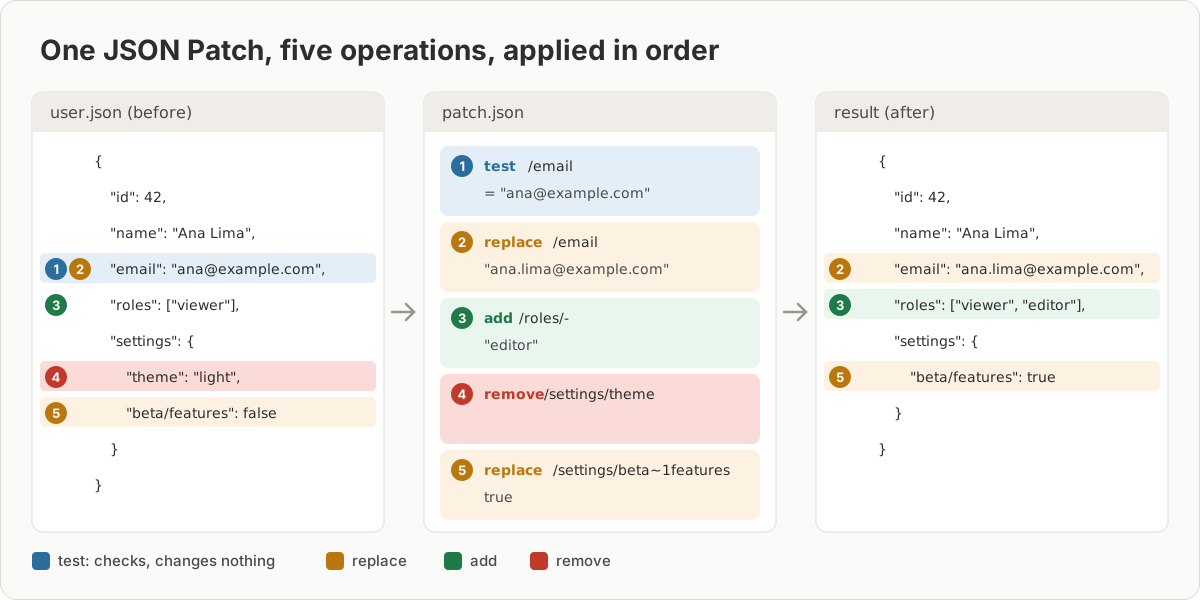
This patch changes the email, but only if it is still the old one. It also adds a role, removes the theme setting and turns on beta features:
[
  { "op": "test", "path": "/email", "value": "ana@example.com" },
  { "op": "replace", "path": "/email", "value": "ana.lima@example.com" },
  { "op": "add", "path": "/roles/-", "value": "editor" },
  { "op": "remove", "path": "/settings/theme" },
  { "op": "replace", "path": "/settings/beta~1features", "value": true }
]
Apply it in Python
With the jsonpatch package (version 1.35):
import json

import jsonpatch  # pip install jsonpatch

with open("user.json") as f:
    user = json.load(f)
with open("patch.json") as f:
    patch = jsonpatch.JsonPatch(json.load(f))

updated = patch.apply(user)  # returns a new document; user is unchanged
print(json.dumps(updated, indent=2))
It prints:
{
  "id": 42,
  "name": "Ana Lima",
  "email": "ana.lima@example.com",
  "roles": [
    "viewer",
    "editor"
  ],
  "settings": {
    "beta/features": true
  }
}
The package also installs two commands. jsonpatch user.json patch.json applies a patch from the terminal, and jsondiff before.json after.json writes the patch that turns one file into the other.
Apply it in Node.js
With fast-json-patch (version 3.1.1). The two extra arguments matter, as the next section shows:
import { readFileSync } from 'node:fs';
import jsonpatch from 'fast-json-patch'; // npm install fast-json-patch

const user = JSON.parse(readFileSync('user.json', 'utf8'));
const patch = JSON.parse(readFileSync('patch.json', 'utf8'));

// validate = true: check every operation; mutate = false: leave user alone
const { newDocument } = jsonpatch.applyPatch(user, patch, true, false);
console.log(JSON.stringify(newDocument, null, 2));
The output is byte-for-byte the same as the Python version.
Send it with cURL
An API that supports JSON Patch expects the operations as the request body. We ran this small server, which uses the same Node.js call, and sent it a patch:
import http from 'node:http';
import jsonpatch from 'fast-json-patch';

let user = { id: 42, name: 'Ana Lima', email: 'ana@example.com', roles: ['viewer'] };

http
  .createServer(async (req, res) => {
    if (req.method !== 'PATCH') return res.writeHead(405).end();
    if (req.headers['content-type'] !== 'application/json-patch+json') {
      return res.writeHead(415).end('Use Content-Type: application/json-patch+json\n');
    }
    let body = '';
    for await (const chunk of req) body += chunk;
    try {
      // validate every op and work on a copy, so a failed patch changes nothing
      user = jsonpatch.applyPatch(user, JSON.parse(body), true, false).newDocument;
      res.writeHead(200, { 'Content-Type': 'application/json' });
      res.end(JSON.stringify(user) + '\n');
    } catch (err) {
      res.writeHead(422).end(`${err.name}: ${err.message.split('\n')[0]}\n`);
    }
  })
.listen(8080);curl -X PATCH http://localhost:8080/users/42 \
-H 'Content-Type: application/json-patch+json' \
--data @ops.jsonops.json holds the first three operations from the patch above. The first request returned 200 and the updated user. Sending the same request again returned 422 with TEST_OPERATION_FAILED: Test operation failed, because the email had already changed. That is what test is for: it stops a patch from being applied to data it wasn't written for. With Content-Type: application/json, our server answered 415. Real APIs choose their own status codes, so check their documentation.
When this fails: errors and silent changes
These are the messages each library gave for common mistakes, with Node.js validation turned on:
| Mistake | Python jsonpatch | Node.js fast-json-patch |
|---|---|---|
test value differs |
JsonPatchTestFailed: ana@example.com (<class 'str'>) is not equal to tested value old@example.com (<class 'str'>) |
TEST_OPERATION_FAILED |
replace or remove a missing key |
JsonPatchConflict: can't replace a non-existent object 'phone' |
OPERATION_PATH_UNRESOLVABLE |
/ in a key not escaped |
JsonPointerException: member 'beta' not found in {…} |
OPERATION_PATH_UNRESOLVABLE |
Path without leading / |
JsonPointerException: Location must start with / |
OPERATION_PATH_INVALID |
Unknown op such as update |
InvalidJsonPatch: Unknown operation 'update' |
OPERATION_OP_INVALID |
| Array index past the end | JsonPatchConflict: can't insert outside of list |
OPERATION_VALUE_OUT_OF_BOUNDS |
fast-json-patch doesn't validate by default. With the plain call applyPatch(doc, patch), these mistakes didn't fail at all in our tests:
replaceon a missing/phoneadded aphonekey.removeon a missing key did nothing and reported success.- A path without the leading slash added a key named
"undefined". addat/roles/5on a one-item array appended the value instead of failing.
fast-json-patch changes your object even when the patch fails. By default it edits the document in place. With a patch that replaced name and then removed a missing key, the call threw an error, but name was already changed in the original object. Pass false as the fourth argument to work on a copy. Python's apply_patch works on a copy unless you pass in_place=True.
Generated patches use indexes, not -. jsondiff and fast-json-patch's compare both produced "path": "/roles/1" for the new role. That is correct for this file, but applied to a version where roles has more items, it inserts in the middle. Add a test operation if the array might have changed.
Try it in JSON Workbench
JSON Workbench doesn't apply patches, but it helps with the two parts people get wrong. Write the patch in the JSON editor, which marks a missing comma or quote as you type. After applying it, paste the document from before and after into JSON Compare to check that only the intended fields changed. If the patch is generated by a script, the guide to editing JSON files and fixing errors explains what each parser error means.
FAQ
What is the difference between JSON Patch and JSON Merge Patch?
JSON Patch (RFC 6902) is a list of operations such as add, remove and replace. JSON Merge Patch (RFC 7386) is a partial copy of the document: keys you send are set, and a key set to null is deleted. Merge Patch is simpler, but it cannot add one item to an array, since arrays are replaced whole, and it cannot set a value to null.
How do I escape a slash in a JSON Patch path?
Write / inside a key as ~1 and ~ as 0. The key beta/features becomes the path /settings/beta1features. Without the escape, the path points at a key named beta, and Python's jsonpatch fails with "member 'beta' not found".
How do I append to an array with JSON Patch?
Use add with - as the last part of the path: { "op": "add", "path": "/roles/-", "value": "editor" }. A number inserts at that position and shifts the rest. An index past the end fails with "can't insert outside of list" in Python.
How do I create a JSON Patch from two JSON files?
With Python's jsonpatch installed, run jsondiff before.json after.json, or call jsonpatch.make_patch(before, after). In Node.js, fast-json-patch has compare(before, after). Both produce a list of operations that turns the first file into the second.
Is there an online JSON Patch editor?
JSON Workbench doesn't apply patches. You can write and check a patch file in the JSON editor, which flags invalid JSON as you type, and paste the document before and after into JSON Compare to see what the patch changed.
Try it yourself
Open the JSON editor
Free, no sign-up. Your file is read and parsed in your browser.
Open the JSON editor