Base64 · 5 min read
JSON to Base64: When You Need It and When You Do Not
Encode JSON to Base64 in the terminal, Python, Node.js or the browser, when headers and URLs need it, and why it makes JSON a third bigger.
Last updated
On this page
To convert JSON to Base64, make the JSON compact, encode the text as UTF-8 bytes, and Base64 those bytes. In a terminal, jq -r 'tojson | @base64' file.json does it in one step. But you only need Base64 when JSON has to travel through something that can't carry it as is, such as an HTTP header, a URL or a Kubernetes Secret. Base64 makes the data a third bigger and hides nothing, so don't use it to secure or shrink JSON. Below are tested ways to encode JSON, the cases that need it, and the mistakes that produce a different string from the same data.
Encode JSON to Base64
All examples encode this order:
{
  "id": 1001,
  "customer": "Zoë Müller",
  "total": 49.9
}
Terminal. jq makes the JSON compact and encodes it, with no trailing newline:
jq -r 'tojson | @base64' order.jsoneyJpZCI6MTAwMSwiY3VzdG9tZXIiOiJab8OrIE3DvGxsZXIiLCJ0b3RhbCI6NDkuOX0=Every correct method below prints this same string.
Python:
import base64
import json

order = {"id": 1001, "customer": "Zoë Müller", "total": 49.9}

text = json.dumps(order, separators=(",", ":"), ensure_ascii=False)  # compact
encoded = base64.b64encode(text.encode("utf-8")).decode("ascii")
print(encoded)
Node.js:
const order = { id: 1001, customer: 'Zoë Müller', total: 49.9 };

const encoded = Buffer.from(JSON.stringify(order), 'utf8').toString('base64');
console.log(encoded);
console.log(Buffer.from(JSON.stringify(order)).toString('base64url')); // for URLs and JWTs
Browser. btoa works on single bytes, so turn the string into UTF-8 bytes first:
const bytes = new TextEncoder().encode(JSON.stringify(order));
const encoded = btoa(String.fromCharCode(...bytes));
For large payloads, encode the bytes in chunks. Spreading 200,000 bytes into one String.fromCharCode call failed in Node.js 24 with RangeError: Maximum call stack size exceeded.
When you need it
Base64 is for channels that only accept a limited set of characters:
- HTTP headers. Node.js 24 refused a header with JSON containing
東京(ERR_INVALID_CHAR: Invalid character in header content) and one containing a newline.fetchfailed withCannot convert argument to a ByteString. The Base64 of the same JSON went through with status 200. - URLs and JWTs. Use the URL-safe form, which replaces
+and/with-and_and usually drops the=. JWT headers and payloads are exactly this: Base64url-encoded JSON. - Kubernetes Secrets. Values under
datamust be Base64. Values understringDatacan be plain text, including JSON. - Data URIs, such as
data:application/json;base64,....
When you don't
- Inside another JSON document. Nest the object, or put the JSON in a string. A JSON string can hold any JSON once the quotes are escaped, and
JSON.stringifyescapes them for you. - To hide or protect data. Base64 is not encryption. Anyone can decode it without a key, as our Base64 to JSON guide shows.
- To save space. Base64 output is 4/3 the size of its input, rounded up to a multiple of 4 characters. We measured it on 200 generated orders:
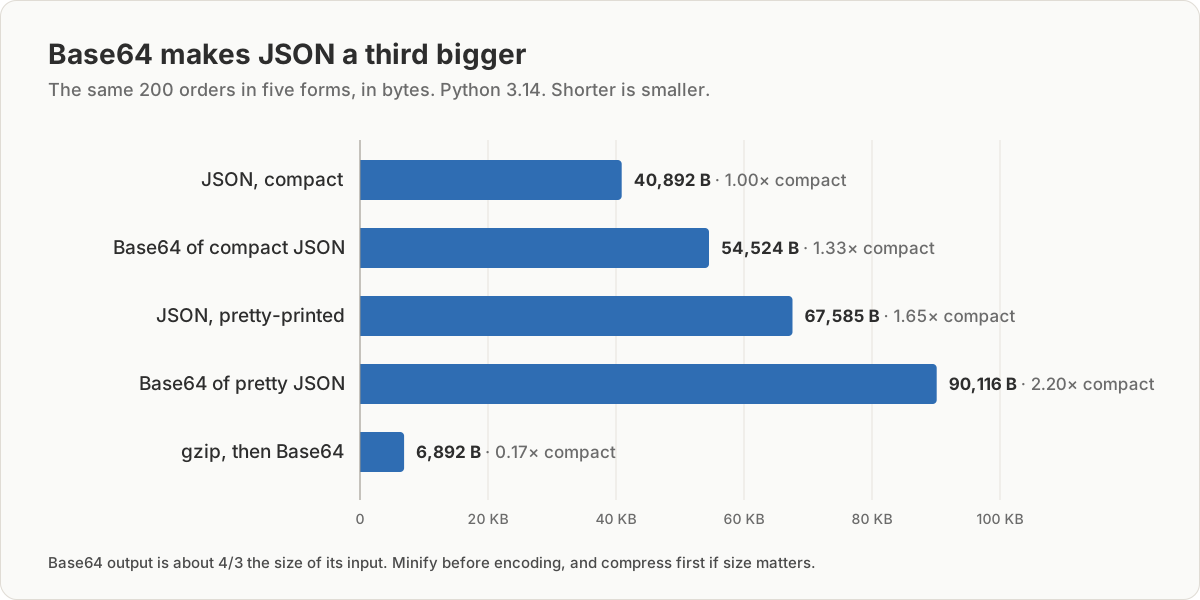
| Version of the same data | Size |
|---|---|
| JSON, compact | 40,892 bytes |
| Base64 of compact JSON | 54,524 bytes |
| JSON, pretty-printed | 67,585 bytes |
| Base64 of pretty JSON | 90,116 bytes |
| gzip, then Base64 | 6,892 bytes |
If the size matters, compress first and Base64 the compressed bytes. The receiver then has to decode and decompress:
import base64, gzip, json

orders = json.load(open("orders.json"))
packed = base64.b64encode(gzip.compress(json.dumps(orders, separators=(",", ":")).encode()))
print(len(packed))  # 6892
When this fails: same JSON, different Base64
Base64 encodes bytes exactly, so any change in the text changes the output, even when the data is the same. We got four different strings for the order above:
| How it was made | Length | Ends with |
|---|---|---|
| Compact JSON (correct) | 68 | …NDkuOX0= |
jq -c . order.json | base64 (trailing newline) |
68 | …NDkuOX0K |
base64 -w 0 order.json (pretty, as saved) |
88 | …NDkuOQp9Cg== |
Python json.dumps(order) without arguments |
84 | …IDQ5Ljl9 |
The Python default adds spaces after : and , and writes ë as \u00eb. All four decode to the same data, but if you compare, cache or sign the Base64, they don't match. Pick one serialization: compact, UTF-8, no trailing newline.
echo adds a newline. echo '{"a":1}' | base64 gave eyJhIjoxfQo=, while printf '%s' '{"a":1}' | base64 gave eyJhIjoxfQ==.
btoa encodes accents wrong without an error. btoa(JSON.stringify(order)) returned a string without failing, but it encoded ë as one byte instead of two UTF-8 bytes. Decoding it gave Zo� M�ller in Node.js, and Python raised UnicodeDecodeError: 'utf-8' codec can't decode byte 0xeb in position 25: invalid continuation byte. Only characters above U+00FF, such as 中, made btoa throw InvalidCharacterError: Invalid character.
Encoding twice. JSON.stringify on a value that is already a JSON string escapes every quote. The Base64 then decodes to "{\"id\":1001,...}", a string instead of an object.
Line wrapping. The base64 command wraps its output every 76 characters. Use base64 -w 0, or jq, which never wraps.
Try it in JSON Workbench
Paste the JSON into the Base64 encoder and click Encode. It encodes the text as UTF-8, so accented and non-Latin characters come out right. It encodes exactly what you pasted, including indentation and line breaks. For the compact form, click Minify in the JSON editor first and paste the result. To check an encoded string, click Decode & Format on it.
FAQ
How do I convert JSON to Base64?
Make the JSON compact, then encode its UTF-8 bytes. In a terminal, jq -r 'tojson | @base64' file.json. In Python, base64.b64encode(json.dumps(obj, separators=(",", ":")).encode()). In Node.js, Buffer.from(JSON.stringify(obj)).toString("base64"). You can also paste the JSON into the Base64 encoder and click Encode.
How do I encode JSON to Base64 in JavaScript?
In Node.js, use Buffer.from(JSON.stringify(obj)).toString('base64'). In the browser, encode the string to bytes with TextEncoder first and pass those to btoa. Calling btoa directly on JSON with accented characters gives a wrong result without any error.
Why does my Base64 end in o= or Cg==?
Your input ended with a newline, usually because it came from echo. A trailing newline adds Cg== or changes the last characters, so the same JSON encodes differently. Use printf '%s' instead of echo, or jq -r 'tojson | @base64'.
Does Base64 make JSON smaller?
No. Base64 output is about 4/3 the size of its input. Our 40,892-byte JSON became 54,524 bytes. To make it smaller, compress it with gzip first, then encode. That brought the same data down to 6,892 bytes.
Can I put Base64 JSON in a URL?
Use the URL-safe variant, which writes - and _ instead of + and /, so nothing needs escaping. Node.js has toString('base64url') and Python has base64.urlsafe_b64encode. Keep it short, since the JSON grows by a third and many servers limit URL length.
Try it yourself
Open the Base64 encoder
Free, no sign-up. Your file is read and parsed in your browser.
Open the Base64 encoder