JSON editor · 5 min read
Validate JSON Against a Schema: A 10-Minute Walkthrough
Write a JSON Schema, then check files with it on the command line, in Python, in Node.js with Ajv and in VS Code. Includes the settings that hide errors.
Last updated
On this page
A JSON Schema is a JSON file that describes what another JSON file must contain: which keys are required, what type each value has, and which values are allowed. To validate a file, you write the schema once, then run a validator such as check-jsonschema on the command line, jsonschema in Python or Ajv in Node.js. Each lists every place the file breaks a rule. In an editor such as VS Code, you get the same errors as you type. This walkthrough takes one order file with six mistakes through each of these.
Step 1: Write the schema
Our example is an order. It needs an integer id, an email, a status from a fixed list and at least one item, and nothing else:
{
  "$schema": "https://json-schema.org/draft/2020-12/schema",
  "title": "Order",
  "type": "object",
  "required": ["id", "email", "status", "items"],
  "properties": {
    "id": { "type": "integer", "minimum": 1 },
    "email": { "type": "string", "format": "email" },
    "status": { "enum": ["pending", "paid", "shipped"] },
    "items": {
      "type": "array",
      "minItems": 1,
      "items": {
        "type": "object",
        "required": ["sku", "qty"],
        "properties": {
          "sku": { "type": "string", "pattern": "^SKU-[0-9]+$" },
          "qty": { "type": "integer", "minimum": 1 }
        },
        "additionalProperties": false
      }
    }
  },
  "additionalProperties": false
}
"additionalProperties": false rejects any key not listed in properties. It catches typos such as "emial", but it also rejects fields you meant to allow, so add those to properties first.
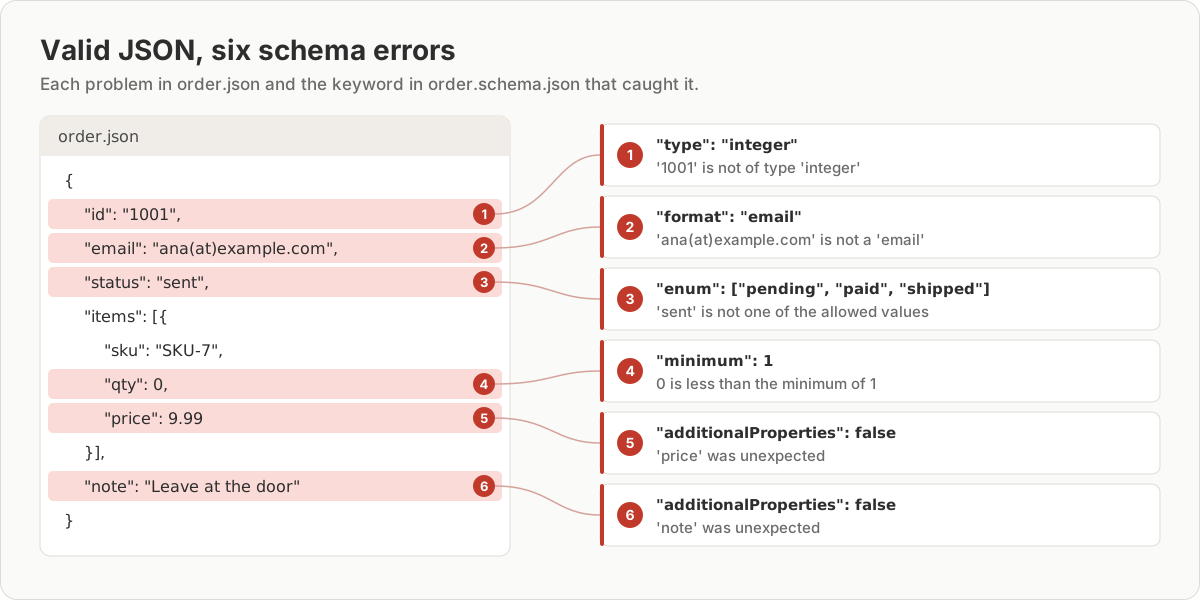
Here is an order that is valid JSON but breaks the schema six times:
{
  "id": "1001",
  "email": "ana(at)example.com",
  "status": "sent",
  "items": [{ "sku": "SKU-7", "qty": 0, "price": 9.99 }],
  "note": "Leave at the door"
}
Step 2: Check it from the command line
check-jsonschema is the fastest way to try a schema. It needs no code:
pip install check-jsonschema
check-jsonschema --schemafile order.schema.json order.jsonSchema validation errors were encountered.
order.json::$.id: '1001' is not of type 'integer'
order.json::$.email: 'ana(at)example.com' is not a 'email'
order.json::$.status: 'sent' is not one of ['pending', 'paid', 'shipped']
order.json::$.items[0].qty: 0 is less than the minimum of 1
order.json::$.items[0]: Additional properties are not allowed ('price' was unexpected)
order.json::$: Additional properties are not allowed ('note' was unexpected)It exits with code 1 on errors and prints ok -- validation done with code 0 when the file passes, so it works as a CI step.
Step 3: Validate in Python
check-jsonschema is built on the jsonschema package (version 4.26), which you can call from your own code:
import json
import sys

from jsonschema import Draft202012Validator, FormatChecker  # pip install jsonschema

with open("order.schema.json") as f:
    schema = json.load(f)
with open(sys.argv[1]) as f:
    order = json.load(f)

Draft202012Validator.check_schema(schema)  # fails fast on a broken schema
validator = Draft202012Validator(schema, format_checker=FormatChecker())

errors = sorted(validator.iter_errors(order), key=lambda e: e.json_path)
for error in errors:
    print(f"{error.json_path}: {error.message}")
print("valid" if not errors else f"{len(errors)} errors")
python3 validate.py order.json prints the same six messages, sorted by path, and then 6 errors. On a corrected order it prints valid.
Step 4: Validate in Node.js with Ajv
Ajv (version 8.20) needs three settings that its defaults leave out:
import { readFileSync } from 'node:fs';
import Ajv2020 from 'ajv/dist/2020.js'; // npm install ajv ajv-formats
import addFormats from 'ajv-formats';

const schema = JSON.parse(readFileSync('order.schema.json', 'utf8'));
const order = JSON.parse(readFileSync(process.argv[2], 'utf8'));

const ajv = new Ajv2020({ allErrors: true }); // default stops at the first error
addFormats(ajv); // without this, "format": "email" throws at compile time
const validate = ajv.compile(schema);

if (validate(order)) {
  console.log('valid');
} else {
  for (const err of validate.errors) {
    console.log(`${err.instancePath || '/'}: ${err.message}`, err.params);
  }
  console.log(`${validate.errors.length} errors`);
}/: must NOT have additional properties { additionalProperty: 'note' }
/id: must be integer { type: 'integer' }
/email: must match format "email" { format: 'email' }
/status: must be equal to one of the allowed values { allowedValues: [ 'pending', 'paid', 'shipped' ] }
/items/0: must NOT have additional properties { additionalProperty: 'price' }
/items/0/qty: must be >= 1 { comparison: '>=', limit: 1 }
6 errorsAjv's messages don't include the bad value, so print err.params too.
Step 5: See errors as you type in VS Code
VS Code validates JSON against a schema without extensions. Either add a $schema key to the data file:
{
  "$schema": "./order.schema.json",
  "id": "1001"
}
Or map files to the schema in .vscode/settings.json, which keeps the data file unchanged:
{
  "json.schemas": [{ "fileMatch": ["/order.json"], "url": "./order.schema.json" }]
}
We ran VS Code 1.120's JSON language server on our order, once with $schema and once with a json.schemas mapping. It flagged all six problems with messages such as Incorrect type. Expected "integer". and String is not an e-mail address. With the $schema method it also flagged a seventh: Property $schema is not allowed., because our schema forbids extra keys. Add "$schema": { "type": "string" } to properties if you use that method.
When this fails: settings that hide errors
These tripped us up while testing:
| What you did | What happened |
|---|---|
Python without format_checker |
The invalid email passed. No error at all |
Python jsonschema.validate() |
Raised one error, not six |
| Ajv's default class with a 2020-12 schema | no schema with key or ref "https://json-schema.org/draft/2020-12/schema" |
Ajv without ajv-formats |
unknown format "email" ignored in schema at path "#/properties/email" |
Ajv without allErrors: true |
Only the first error: must NOT have additional properties |
Typo "minimun": 1 in the schema |
Ajv: strict mode: unknown keyword: "minimun". Python accepted it and let 0 through |
Two more behaviours to know:
1.0counts as an integer in both libraries, because JSON Schema compares numbers by value, and1.0equals1.- A schema check needs valid JSON first. On a file with a syntax error, Python stops with
JSONDecodeError: Expecting value: line 1 column 1 (char 0)before the schema is used, andcheck-jsonschemareportsFailed to parse.
Try it in JSON Workbench
The JSON Workbench editor checks syntax, not schemas. In our test, a file whose $schema pointed at the public package.json schema had "name": 123, and the editor didn't flag it. It showed only a yellow warning: Unable to load schema … No schema request service available. Use it for the step before validation: paste the file into the JSON editor to fix syntax errors (see how to fix a broken JSON file), then run one of the validators above. To see what changed between a failing and a passing version, paste both into JSON Compare.
FAQ
Which JSON editor validates against a schema?
VS Code does it out of the box. Add a "$schema" key that points to the schema, or map files to a schema with the json.schemas setting, and every mismatch is underlined as you type. In our test it found all six problems. The JSON Workbench editor checks syntax only, not schemas.
What does $schema do in a JSON file?
In a schema, "$schema" names the JSON Schema version it is written in, such as https://json-schema.org/draft/2020-12/schema. In a data file, editors like VS Code read it as "validate this file against that schema". If the schema has "additionalProperties": false, list $schema in its properties, or the data file fails its own schema.
Why does my validator ignore "format": "email"?
Because the JSON Schema spec treats format as a note by default. Python's jsonschema only checks it when you pass format_checker=FormatChecker(). Ajv refuses to compile the schema until you add the ajv-formats package. check-jsonschema and VS Code checked it without extra setup in our tests.
Is validating JSON the same as validating against a schema?
No. Validating JSON checks the syntax, such as commas, quotes and brackets. A schema check runs after that and checks the content, such as a required key or a number in the right range. A file must parse before any schema validator can check it.
Which JSON Schema version should I use?
We used 2020-12, which Python's jsonschema 4.26, Ajv 8.20, check-jsonschema 0.38 and VS Code 1.120 all supported. Whatever you pick, write it in the schema's "$schema" key and use the matching validator class, such as Draft202012Validator in Python or ajv/dist/2020 in Node.js.
Try it yourself
Open the JSON editor
Free, no sign-up. Your file is read and parsed in your browser.
Open the JSON editor