JSON editor · 7 min read
Edit JSON on Linux and Ubuntu: 5 Tools Compared Honestly
We broke one JSON file and opened it in GNOME Text Editor, nano, Neovim, VS Code and jq on Ubuntu 26.04 to see which tools catch the mistakes.
Last updated
On this page
- The test file
- 1. GNOME Text Editor: already there, easy to misread
- 2. nano: in every terminal, checks nothing
- 3. Neovim and Vim: good colours, risky formatting
- 4. VS Code: the only one that explains every mistake
- 5. jq: edits that can't break the file
- When this fails: the errors and traps we hit
- Try it in JSON Workbench
- FAQ
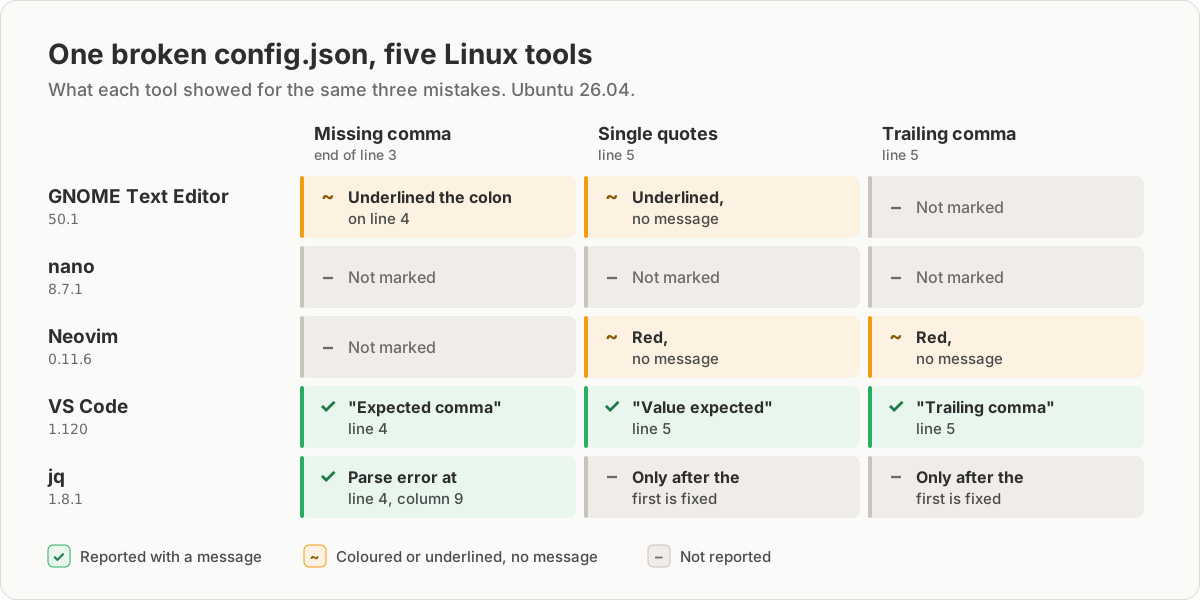
On Linux, the editors you already have will open a JSON file but won't tell you when you break it. We put three common mistakes into one file and opened it in five tools on Ubuntu 26.04. Only VS Code listed all three with a message. GNOME Text Editor and Neovim marked two, nano marked none, and jq reported the first. So whatever you edit with, run jq empty file.json or python3 -m json.tool file.json before you use the file, and make scripted changes with jq, which can't write invalid JSON.
The test file
Every tool got the same config.json. It has a missing comma at the end of line 3, single quotes on line 5, and a trailing comma after the last item:
{
  "name": "orders-api",
  "port": 8080
  "debug": true,
  "hosts": ['api.local', "api.test"],
}
We used the versions in Ubuntu 26.04's own repositories: GNOME Text Editor 50.1, nano 8.7.1, Neovim 0.11.6, vim.tiny 9.1 and jq 1.8.1, plus VS Code 1.120 from Microsoft.
| Tool | On Ubuntu by default | Flags mistakes | Size |
|---|---|---|---|
| GNOME Text Editor (window) | Yes, on the desktop | 2 of 3, no messages | 1.7 MB |
| nano (terminal) | Yes | None | 0.9 MB |
| Neovim (terminal) | No; vi is vim.tiny |
2 of 3, no messages | 8.9 MB |
| VS Code (window) | No | All 3, with messages | 645 MB |
| jq (terminal) | No | The first, with line and column | 0.1 MB |
Size is the installed size apt reports for the package itself, without its dependencies.
1. GNOME Text Editor: already there, easy to misread
It is the default text editor on Ubuntu Desktop and colours JSON as soon as the file ends in .json. It put a red dotted underline under the single-quoted 'api.local' and under the colon after "debug", which is one line after the missing comma. It did not mark the trailing comma.
The catch is that the spell checker uses the same red dotted underline. In our file it also underlined api in "orders-api", which is a spelling suggestion, not an error. There is no way to tell the two apart and no message explaining either. Use it for quick edits, then validate the file.
2. nano: in every terminal, checks nothing
nano colours JSON out of the box: the json.nanorc syntax file is included by Ubuntu's default /etc/nanorc. It doesn't flag any of the three mistakes.
It can format through jq. Press Ctrl+T, type |jq . and press Enter, and nano pipes the text through jq and replaces it with the formatted result. On our broken file the command failed, nano kept the original text and showed a red [ Error: --- ] bar, without jq's message. Run jq empty config.json in another terminal to find out what is wrong.
3. Neovim and Vim: good colours, risky formatting
On Ubuntu Desktop, vi starts vim.tiny and there is no vim command until you install one. vim.tiny's --version output lists -syntax, meaning it was built without syntax colouring, so it shows the file as plain text. Install the vim or neovim package to get colours.
Neovim highlighted the single quotes and the trailing comma in red. It did not mark the missing comma, the mistake that most often breaks a file.
The usual way to format JSON in Vim is to filter the buffer through jq:
:%!jq .On valid JSON this works well. On our broken file, both Neovim and vim.tiny replaced the whole buffer with a single line, jq's error message. Press u to get your text back, and don't save before you do. To check without touching the buffer, send it to jq instead:
:w !jq emptyThat prints jq: parse error: Expected separator between values at line 4, column 9 and leaves your text alone.
4. VS Code: the only one that explains every mistake
VS Code checks JSON as you type with its built-in JSON extension. We ran the language server that ships with VS Code 1.120 on our file. It reported all three mistakes at once:
line 4, col 3: Expected comma
line 5, col 13: Value expected
line 5, col 37: Trailing comma
Each appears as a squiggle in the editor and as a line in the Problems panel. Format Document (from the command palette, Ctrl+Shift+P) re-indents the file. It also ran on our broken file without complaint and fixed none of the mistakes.
VS Code is not in Ubuntu's repositories. Microsoft publishes a .deb on its website and a snap (sudo snap install code --classic). The installed package is 645 MB, which is a lot if all you need is to fix a config file.
5. jq: edits that can't break the file
jq isn't an editor, but it is the safest way to change JSON from a terminal or a script. It reads the whole file, applies your change and writes valid JSON back. It has no in-place option, so write to a temporary file and move it over the original:
sudo apt install jq
jq empty config.json                     # no output means valid
jq '.port = 9090' config.json > config.tmp && mv config.tmp config.json
On our broken file, jq empty printed jq: parse error: Expected separator between values at line 4, column 9 and exited with code 5. It reports one mistake at a time, so expect to run it again after each fix.
jq 1.8.1 rewrites the whole file with two-space indentation, so the diff can be bigger than your change. It kept number literals as written: 1.10 stayed 1.10 and 12345678901234567890 was not rounded. It does round numbers you do maths on. .id + 0 turned that ID into 12345678901234567000.
When this fails: the errors and traps we hit
jq emptied the file. jq '.port = 9090' config.json > config.json exits with code 0 and leaves a 0-byte file. The shell truncates config.json before jq reads it. Always write to a different file first.
Vim replaced the file with an error message. :%!jq . on invalid JSON puts jq: parse error: … in place of your text. Press u straight away.
Python changed your numbers. python3 -m json.tool is the validator that is always on Ubuntu, but if you use it to reformat, it rewrote 1.10 as 1.1 and 1e2 as 100.0 in our test. It also indents with four spaces. On our broken file it printed:
Expecting ',' delimiter: line 4 column 3 (char 43)The line number is after the mistake. jq, Python and VS Code all pointed at line 4 for a comma missing at the end of line 3. A parser only notices a missing comma when it reaches the next item, so look at the line above too. How to edit a JSON file online lists the message each mistake produces.
Large files. All five tools load the whole file. For files over about 10 MB, see how to edit big JSON files without crashing your editor.
Try it in JSON Workbench
If you are on a machine where you can't install anything, open the JSON editor in your browser and paste the file. Like jq, it reports one mistake at a time. In Chrome, our test file got a squiggle on line 4 and a red Validation Error bar reading Line 4:3 - Expected ',' or '}' after property value in JSON at position 43 (line 4 column 3). Format stays disabled until the text is valid. Before you save over the original, paste both versions into JSON Compare to check you changed only what you meant to.
FAQ
What is the best JSON editor for Linux?
For editing by hand, VS Code, because in our test it was the only one of the five that listed every mistake with a message. If you don't want a 645 MB install, use the editor you already have and check the file with jq empty file.json before you use it. For changes from scripts, use jq.
How do I edit a JSON file in the Linux terminal?
Open it with nano file.json or vi file.json, make the change, save, then run jq empty file.json. No output means the file is valid. To change a value without opening the file, run jq '.port = 9090' file.json > file.tmp && mv file.tmp file.json.
How do I format JSON in Vim or Neovim?
Run :%!jq . to replace the buffer with formatted JSON. If the JSON is broken, the buffer is replaced with jq's error message instead, so press u to undo. Check first with :w !jq empty, which leaves the buffer alone.
Which JSON editor comes with Ubuntu?
None checks JSON out of the box. Ubuntu Desktop includes GNOME Text Editor and nano, and vi is vim.tiny, which has no syntax colours at all. Python 3 is also installed, so python3 -m json.tool file.json works as a validator without installing anything.
Why did jq empty my JSON file?
Because the command wrote to the file it was reading, as in jq . file.json > file.json. The shell empties file.json before jq starts, so jq reads nothing and exits with code 0. Write to a temporary file and then mv it over the original.
Try it yourself
Open the JSON editor
Free, no sign-up. Your file is read and parsed in your browser.
Open the JSON editor