Folder compare · 7 min read
Free Folder Compare Tools: What Each One Is Good For
Meld, KDiff3, WinMerge, FreeFileSync and an online option compared on the same two folders, with what each checks and which one to pick.
Last updated
On this page
The best free folder compare tool is WinMerge on Windows and Meld on Linux. Both compare the contents of every file, show the two folders side by side and open the changed lines of any file with a double-click. KDiff3 runs on Windows, Mac and Linux and adds three-way merging. FreeFileSync is the pick when you want to sync the folders afterwards. If you can't install anything, an online tool such as Folder Compare works in the browser. The real differences show up in the details: whether a copied file with a new date counts as changed, how line endings and renamed files are handled, and which folders are skipped. We ran Meld and KDiff3 on the same two folders to show exactly that.
Quick pick
| You want to | Use |
|---|---|
| Compare folders on Windows | WinMerge |
| Compare folders on Linux | Meld |
| One tool for Windows, Mac and Linux, or a three-way merge | KDiff3 |
| Make two folders the same afterwards, such as a backup | FreeFileSync |
| Compare without installing anything | Folder Compare in the browser |
| A list of changes you can paste into a ticket or script | git diff --no-index from the command line |
All of these are free and open source. Beyond Compare is popular, but it is paid software with a free trial.
How we tested
We used the two folders from our guide to finding changed files: a small project on a laptop and a copy on a USB stick made with cp -r, which gives every file a new date. Then we made seven changes to the copy, including a file whose only change was Windows line endings, three renames and moves, and an edit inside node_modules.
We ran Meld 3.22 and KDiff3 1.12 on Ubuntu 26.04 and looked at what each one reported. WinMerge only runs on Windows, and FreeFileSync's installer needs an interactive desktop session we couldn't provide, so those sections are based on their documentation.
Meld: the clearest view (Linux, Windows)
On Ubuntu, install it and compare two folders like this:
sudo apt install meld
meld laptop usb
You can also open Meld, click New comparison, choose Directory comparison and pick the folders. Meld shows both folder trees side by side, with every subfolder expanded:
- Changed files are blue, files that exist on one side only are green, and the missing side is crossed out.
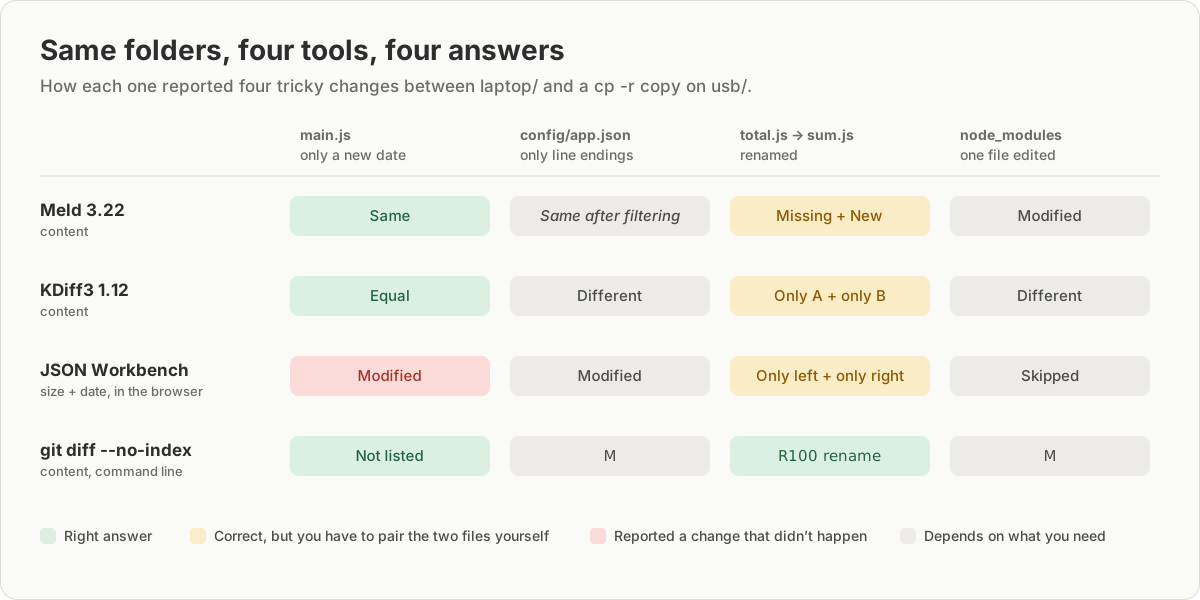
src/main.js, which only had a new date, showed as unchanged. Meld compares content by default. There is a "shallow comparison" setting that compares size and date instead, and it is off.config/app.json, whose only change was its line endings, showed in italics. Meld's source code describes this as identical after filtering: for text files, it ignores line-ending differences.- The renamed
src/total.jsshowed as missing on the right, withsrc/sum.jsas new. Meld doesn't pair renamed files. node_moduleswas compared like any other folder. Meld hides version control folders such as.git, Mac and Windows system files such as.DS_StoreandThumbs.db, backup files and compiled binaries by default. You can change these under File Filters.
Double-click a file to see its changed lines and copy changes between sides. On Windows, use the installer from the Meld website.
KDiff3: for merging, on every system
Run kdiff3 laptop usb. KDiff3 first shows a summary. Ours said "Number of equal files: 1" and "Number of different files: 11". The one equal file was main.js, so KDiff3 also compares content by default. Every other file counted as different, including:
config/app.json, because KDiff3 compares the bytes and the line endings are different bytes.- Each file that exists on one side only, such as the old and new names of the renamed files.
- The file inside
node_modules, which isn't skipped.
The folder view has an A and a B column and an Operation column with what a merge would do for each item, such as Merge or copying from A or B. Nothing happens until you start the merge from the Merge menu. KDiff3 is built for merging two or three versions into one. To just see what changed, Meld and WinMerge are easier to read. KDiff3 runs on Windows, Mac and Linux.
WinMerge: the standard on Windows
WinMerge is the most widely used free compare tool on Windows. We couldn't run it ourselves, so this is from its documentation. Choose File, then Open, pick the two folders and tick Include Subfolders. Under Options, Compare, Folder, you choose the compare method. Full Contents reads every file. The faster Modified Date and Size methods don't, so they have the same problem as other size-and-date checks: a copied folder looks changed. WinMerge also has an option to ignore line-ending differences between Windows and Unix files, and filters to skip folders such as .git.
FreeFileSync: compare, then sync
FreeFileSync is a sync and backup tool for Windows, Mac and Linux, and its comparison step works as a folder compare. According to its manual, the default comparison is File time and size, which is fast but reports a freshly copied folder as different. Switch the comparison to File content when you need to know whether the files really differ. After comparing, it shows what a sync would copy or delete, and only changes files when you click Synchronize.
Other options
- FileMerge on a Mac comes free with Apple's Xcode, a large download from the App Store. It compares folders and files side by side.
- VS Code compares two files out of the box: right-click the first, choose Select for Compare, then Compare with Selected on the second. Comparing folders needs an extension, such as Compare Folders.
- The command line gives the most precise list, including renames. See finding which files changed for
git diff --no-index, and built-in ways on Windows, Mac and Linux for tools that are already installed.
Side by side
| Tool | Compares | Renames | Skips |
|---|---|---|---|
| Meld | Content | No | .git, system files |
| KDiff3 | Content | No | .git |
| WinMerge | Content | No | Set by you |
| FreeFileSync | Size and date | When syncing | Set by you |
| JSON Workbench | Size and date | No | node_modules, .git |
Meld also ignores line-ending differences in text files, and the WinMerge row assumes its Full Contents method.
When this fails
| Symptom | Cause | Fix |
|---|---|---|
| Every file in a copied folder is different | The tool is comparing size and date | Switch to content: Full Contents in WinMerge, File content in FreeFileSync |
| A file is different, but every line looks the same | Only the line endings changed | Meld ignores them for text files; in WinMerge, turn on the option to ignore them |
| A renamed file shows as missing and new | These tools don't detect renames | Pair them yourself, or use git diff --no-index |
node_modules or .git floods the list |
The folder isn't filtered | Add it to the tool's filters |
| A file you expected is missing from the list | A default filter hides it, such as .DS_Store or *.bak |
Check the tool's filter settings |
Try it in JSON Workbench
If you can't install software on the computer you're using, open Folder Compare, choose the two folders and click Differences. It runs in the browser without uploading the files, and you can click any file to see its changed lines. It compares size and date and skips node_modules and .git, so on a freshly copied folder, use it to look at the changes and a content check to confirm them. How to compare two folders online explains how it works.
FAQ
What is the best free folder compare tool?
On Windows, WinMerge. On Linux, Meld, which also runs on Windows. Both compare file contents, show folders side by side and open the changed lines of a file with a double-click. KDiff3 runs on Windows, Mac and Linux and is the better choice if you need to merge three versions. If you can't install anything, Folder Compare runs in the browser.
Is there a free folder compare tool for Mac?
Yes. KDiff3 has a Mac version, and FileMerge comes free with Apple's Xcode. Without installing anything, diff -rq in Terminal lists the files that differ, as shown in our guide to built-in ways.
Why does my folder compare show files as changed when they are the same?
The tool, or its current setting, compares size and date instead of content. A copied folder gets new dates, so every file looks changed. Switch to a content comparison, such as Full Contents in WinMerge or File content in FreeFileSync. Meld and KDiff3 compare content by default.
Can a folder compare tool detect renamed files?
Meld and KDiff3 can't. In our test, a renamed file showed up as one missing and one new file in both. git diff --no-index pairs them and prints R100 for a rename with unchanged content, as explained in finding which files changed.
Try it yourself
Open Folder Compare
Free, no sign-up. Your file is read and parsed in your browser.
Open Folder Compare